JSP include directive examples
- Details
- Written by Nam Ha Minh
- Last Updated on 22 July 2019 | Print Email
<%@ include file="content.html" %>
1. Syntax of JSP include directive
Classic syntax:<%@ include file="relative URL" %>
XML syntax:<jsp:directive.include file="relative URL"/>
The included file’s URL can be relative to the web application’s context path or relative to the current JSP page.2. Rules & Semantics of JSP include directive
The inclusion happens at translation time when the including JSP page is being compiled. The JSP compiler merges the included file’s source code into the current JSP page to produce a final page. The following picture explains the inclusion process for the include directive: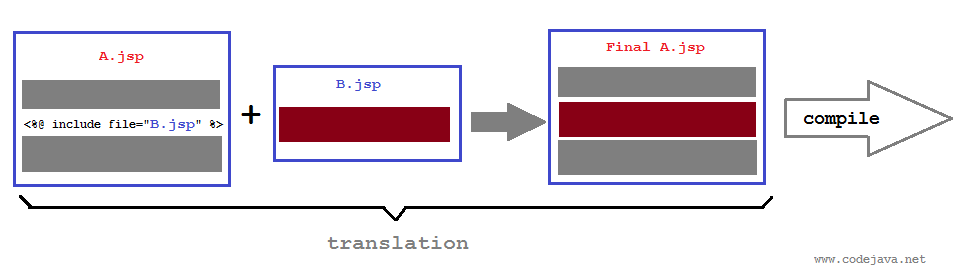 Following are some rules:
- The included page cannot change response status code or set headers. The JSP container will ignore such attempts.
- The JSP compiler inserts verbatim source code of the included page at the position where the include directive is declared (position-sensitive).
- Runtime expression is not accepted for the file’s URL, since the inclusion happens at translation time, not runtime.
- The include directive cannot include dynamic content such as a servlet.
- The JSP compiler will throw an exception if it could not find the included page.
3. JSP include directive Examples
- Include a file which is relative to the current JSP page:
<%@ include file="content.html" %>

<%@ include file="some/path/content.html" %>

<jsp:directive.include file="content.html"/>
- Include a file which is relative to the web application’s context path (URL starts with a slash):
<%@ include file="/content.html" %>

<%@ include file="/some/path/content.html" %>

<jsp:directive.include file="/content.html"/>
Let’s see a common example in which a main JSP page includes two files header and footer. Because header and footer are common to all pages so it’s recommended to separate them into two files which can be reused across the main pages.Code of the home.jsppage:
<%@ page language="java" contentType="text/html; charset=UTF-8"
    pageEncoding="UTF-8"%>
<!DOCTYPE html PUBLIC "-//W3C//DTD HTML 4.01 Transitional//EN"
	"http://www.w3.org/TR/html4/loose.dtd">
<html>
<head>
<meta http-equiv="Content-Type" content="text/html; charset=UTF-8">
<title>Home Page</title>
</head>
<body>

	<%@include file="header.html" %>

	<hr/>
	<h2>This is main content</h2>
	<hr/>

	<%@include file="footer.html" %>

</body>
</html>
Code of the header.htmlpage:<h1>This is header</h1>Code of the footer.htmlpage:
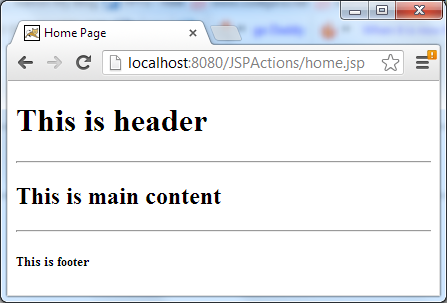
<h5>This is footer</h5>Output when running the home.jsp page:
Related JSP Tutorials:
- jsp:include standard action examples
- Differences between JSP include directive and JSP include action
Other JSP Tutorials:
- Summary of EL operators with examples
- Java Servlet and JSP Hello World Tutorial with Eclipse, Maven and Apache Tomcat
- How to handle exceptions in JSP
- How to list records in a database table using JSP and JSTL
- How to create dynamic drop down list in JSP from database
- Sending e-mail with JSP, Servlet and JavaMail
About the Author:
 Nam Ha Minh is certified Java programmer (SCJP and SCWCD). He began programming with Java back in the days of Java 1.4 and has been passionate about it ever since. You can connect with him on Facebook and watch his Java videos on YouTube.