jsp:plugin, jsp:params and jsp:fallback actions examples
- Details
- Written by Nam Ha Minh
- Last Updated on 22 July 2019 | Print Email
<jsp:plugin
    type="applet"
    code="net.codejava.applet.MyApplet.class"
    codebase="html">

    <jsp:params>
        <jsp:param name="username" value="Tom" />
    </jsp:params>

    <jsp:fallback>
        <p>Could not load applet!</p>
    </jsp:fallback>

</jsp:plugin>
1. Syntax of JSP plugin action
Following is the complete syntax of the <jsp:plugin> action:<jsp:plugin type="bean|applet"
code="objectCode"
codebase="objectCodebase"
{optional attributes}
{ <jsp:params>
{ <jsp:param name="paramName" value="paramValue" /> }+
</jsp:params> }
{ <jsp:fallback> arbitrary_text </jsp:fallback> }
</jsp:plugin>
The optional attributes are described in the Attributes Description section below.The <jsp:params> and <jsp:fallback> elements are optional. If the <jsp:params> element is specified, it must contain at least one sub element <jsp:param>.2. Attributes of JSP plugin action
Attribute name | Required | Description |
type | Yes | Specifies type of the component: applet or bean. |
code | Yes | Class name of the applet or JavaBean, in the form of packagename.classname.class. |
codebase | Yes | Base URL that contains class files of the component. |
align | Optional | Alignment of the component. Possible values are: left, right, top, middle, bottom. |
archive | Optional | Specifies a list of JAR files which contain classes and resources required by the component. |
height, width | Optional | Specifies height and width of the component in pixels. |
hspace, vspace | Optional | Specifies horizontal and vertical space between the component and the surrounding components, in pixels. |
jreversion | Optional | Specifies JRE version which is required by the component. Default is 1.2. |
name | Optional | Name of the component. |
title | Optional | Title of the component. |
nspluginurl, iepluginurl | Optional | Specifies URL where JRE plugin can be downloaded for Netscape or IE browser, respectively. |
mayscript | Optional | Accepts true/false value. If true, the component can access scripting objects (Javascript) of the web page. |
3. <jsp:params> action
This action is an optional, direct child of the <jsp:plugin> action. It cannot be used elsewhere. If specified, it must contain one or more <jsp:param> actions to provide additional parameters for the component. For example:<jsp:params> <jsp:param name="param1" value="value1" /> <jsp:param name="param2" value="value2" /> </jsp:params>
4. <jsp:fallback> action
This action is an optional, direct child of the <jsp:plugin> action. Its purpose is to specify some content which is used by the client browser in case the plugin cannot be started. Common usage is to show some text that indicates there’s a problem of loading the component. For example:<jsp:fallback> <p>Could not load applet!</p> </jsp:fallback>This action cannot be used elsewhere outside the <jsp:plugin> action.
5. JSP plugin action Examples
package net.codejava.applet;
import java.awt.BorderLayout;
import java.awt.Color;
import java.awt.Font;
import javax.swing.JApplet;
import javax.swing.JLabel;
public class MyApplet extends JApplet {
private JLabel label = new JLabel();
public void init() {
label.setHorizontalAlignment(JLabel.CENTER);
label.setFont(new Font("Arial", Font.BOLD, 20));
label.setForeground(Color.BLUE);
setLayout(new BorderLayout());
add(label, BorderLayout.CENTER);
}
public void start() {
String firstName = getParameter("firstName");
String lastName = getParameter("lastName");
label.setText("Hello " + firstName + " " + lastName);
}
} Code of the JSP page:<%@ page language="java" contentType="text/html; charset=UTF-8"
pageEncoding="UTF-8"%>
<!DOCTYPE html PUBLIC "-//W3C//DTD HTML 4.01 Transitional//EN"
"http://www.w3.org/TR/html4/loose.dtd">
<html>
<head>
<meta http-equiv="Content-Type" content="text/html; charset=UTF-8">
<title>JSP Plugin action Demo</title>
</head>
<body>
<div align="center">
<jsp:plugin
type="applet"
code="net.codejava.applet.MyApplet.class"
codebase="appletCode"
align="">
<jsp:params>
<jsp:param name="firstName" value="James" />
<jsp:param name="lastName" value="Bond" />
</jsp:params>
<jsp:fallback>
	<p>Could not load applet!</p>
</jsp:fallback>
</jsp:plugin>
</div>
</body>
</html>Output when running the PluginDemo.jsp page: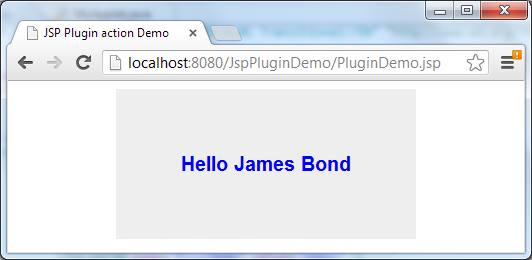
Other JSP actions:
- jsp:include standard action examples
- jsp:param standard action examples
- jsp:forward standard action examples
Other JSP Tutorials:
- Summary of EL operators with examples
- Java Servlet and JSP Hello World Tutorial with Eclipse, Maven and Apache Tomcat
- How to handle exceptions in JSP
- How to list records in a database table using JSP and JSTL
- How to create dynamic drop down list in JSP from database
- Sending e-mail with JSP, Servlet and JavaMail
About the Author:
 Nam Ha Minh is certified Java programmer (SCJP and SCWCD). He began programming with Java back in the days of Java 1.4 and has been passionate about it ever since. You can connect with him on Facebook and watch his Java videos on YouTube.
 JspPluginDemo.war JspPluginDemo.war | [Deployable WAR file] | 4 kB |