JSTL XML Tags x:choose, x:when, x:otherwise Examples
- Details
- Written by Nam Ha Minh
- Last Updated on 01 September 2019 | Print Email
In JSTL, the <x:choose>, <x:when>, <x:otherwise> tags are the XML counterparts of the core tags to perform conditional inclusion of data while parsing an XML document. The <x:choose> tag marks the beginning of a condition, <x:when> tag evaluates a condition and then includes its body if the condition evaluates to true. The <x:otherwise> tag includes its body when all of the conditions specified using <x:when> tags evaluates to false.
Note that <x:choose> and <x:otherwise> tags does not have any attributes.
JSTL <x:choose>, <x:when>, <x:otherwise> Syntax:
<x:choose>
<x:when select="<string>">
...
</x:when>
<x:when select="<string>">
...
</x:when>
...
...
<x:otherwise>
...
</x:otherwise>
</x:choose>
Name | Required | Description |
select | True | Condition which determines whether or not the body content should be processed. |
JSTL <x:choose>, <x:when>, <x:otherwise> Examples:
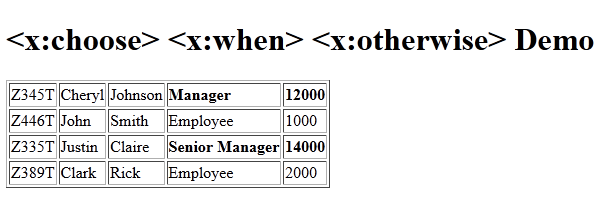
The following JSP code uses <x:choose>, <x:when>, <x:otherwise> tags to display citizens information along with their role and salary. The role and salary is shown in bold for the salary greater than 10,000.
<%@ page language="java" contentType="text/html; charset=ISO-8859-1"
pageEncoding="ISO-8859-1"%>
<%@ taglib uri="http://java.sun.com/jsp/jstl/core" prefix="c" %>
<%@ taglib uri="http://java.sun.com/jsp/jstl/xml" prefix="x"%>
<!DOCTYPE html PUBLIC "-//W3C//DTD HTML 4.01 Transitional//EN"
"http://www.w3.org/TR/html4/loose.dtd">
<html>
<head>
<meta http-equiv="Content-Type" content="text/html; charset=ISO-8859-1">
<title><x:choose> <x:when> <x:otherwise> Demo</title>
</head>
<body>
<h1><x:choose> <x:when> <x:otherwise> Demo</h1>
<c:import
url="http://localhost:8080/JSTL-Tag-Reference/tag-types/xml/citizens.xml"
var="citizenXML"/>
<x:parse var="doc" xml="${citizenXML}" />
<table border="1">
<x:forEach var="student" select="$doc/citizens/citizen">
<tr>
<x:choose>
<x:when select="salary>10000">
<td><x:out select="ssn" /></td>
<td><x:out select="firstname" /></td>
<td><x:out select="lastname" /></td>
<td><b><x:out select="role" /></b></td>
<td><b><x:out select="salary"/></b></td>
</x:when>
<x:otherwise>
<td><x:out select="ssn" /></td>
<td><x:out select="firstname" /></td>
<td><x:out select="lastname" /></td>
<td><x:out select="role" /></td>
<td><x:out select="salary" /></td>
</x:otherwise>
</x:choose>
</tr>
</x:forEach>
</table>
</body>
</html> XSLT Template (given for reference):
<?xml version="1.0"?>
<xsl:stylesheet xmlns:xsl="http://www.w3.org/1999/XSL/Transform"
    version="1.0">
    <xsl:output method="html" indent="yes" />
    <xsl:template match="/">
        <html>
            <body>
                <xsl:apply-templates />
            </body>
        </html>
    </xsl:template>
    <xsl:template match="citizens">
        <table border="1" width="200">
            <xsl:for-each select="citizen">
                <tr>
                    <td>
                        <xsl:value-of select="ssn" />
                    </td>
                    <td>

                        <xsl:value-of select="firstname" />

                    </td>
                    <td>
                        <xsl:value-of select="lastname" />
                    </td>
                    <td>
                        <xsl:value-of select="role" />
                    </td>
                    <td>
                        <xsl:value-of select="salary" />
                    </td>

                </tr>
            </xsl:for-each>
        </table>
    </xsl:template>
</xsl:stylesheet>
XML Document (given for reference):
<?xml version='1.0' encoding='UTF-8' standalone='no'?>
<citizens>
    <citizen>
        <ssn>Z345T</ssn>
        <firstname>Cheryl</firstname>
        <lastname>Johnson</lastname>
        <role>Manager</role>
        <salary>12000</salary>
    </citizen>
    <citizen>
        <ssn>Z446T</ssn>
        <firstname>John</firstname>
        <lastname>Smith</lastname>
        <role>Employee</role>
        <salary>1000</salary>
    </citizen>
    <citizen>
        <ssn>Z335T</ssn>
        <firstname>Justin</firstname>
        <lastname>Claire</lastname>
        <role>Senior Manager</role>
        <salary>14000</salary>
    </citizen>
    <citizen>
        <ssn>Z389T</ssn>
        <firstname>Clark</firstname>
        <lastname>Rick</lastname>
        <role>Employee</role>
        <salary>2000</salary>
    </citizen>
</citizens>
Output:
Recommended Usage of <x:choose>, <x:when>, <x:otherwise> tags:
We may need to perform conditional logic while parsing any XML data. These tags are useful in those scenarios where we can either display or process the data based on various conditions. The condition is specified as an XPath expression to the select attribute of the <x:when> tag.
XPath JAR download:
Other JSTL XML Tags:
forEach | if | out | param | parse | set | transform
About the Author:
 Nam Ha Minh is certified Java programmer (SCJP and SCWCD). He began programming with Java back in the days of Java 1.4 and has been passionate about it ever since. You can connect with him on Facebook and watch his Java videos on YouTube.