Java JDBC CRUD Tutorial: SQL Insert, Select, Update, and Delete Examples
- Details
- Written by Nam Ha Minh
- Last Updated on 02 September 2019 | Print Email
1. Prerequisites
To begin, make sure you have the following pieces of software installed on your computer:- JDK (download JDK 7).
- MySQL (download MySQL Community Server 5.6.12). You may also want to download MySQL Workbench - a graphical tool for working with MySQL databases.
- JDBC Driver for MySQL (download MySQL Connector/J 5.1.25). Extract the zip archive and put the mysql-connector-java-VERSION-bin.jar file into classpath (in a same folder as your Java source files).
2. Creating a sample MySQL database
Let’s create a MySQL database called SampleDB with one table Users with the following structure: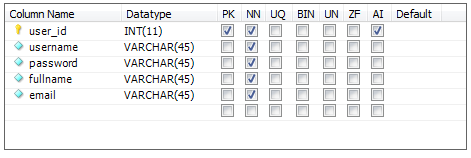 Execute the following SQL script inside MySQL Workbench:
create database SampleDB; use SampleDB; CREATE TABLE `users` ( `user_id` int(11) NOT NULL AUTO_INCREMENT, `username` varchar(45) NOT NULL, `password` varchar(45) NOT NULL, `fullname` varchar(45) NOT NULL, `email` varchar(45) NOT NULL, PRIMARY KEY (`user_id`) );Or if you are using MySQL Command Line Client program, save the above script into a file, let’s say, SQLScript.sqland execute the following command:
source Path\To\The\Script\File\SQLScript.sql
Here’s an example screenshot taken while executing the above script in MySQL Command Line Client program: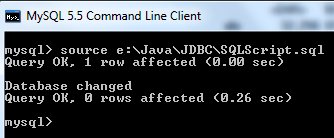
3. Understand the main JDBC interfaces and classes
Let’s take an overview look at the JDBC’s main interfaces and classes with which we usually work. They are all available under the java.sql package:- DriverManager: this class is used to register driver for a specific database type (e.g. MySQL in this tutorial) and to establish a database connection with the server via its getConnection() method.
- Connection: this interface represents an established database connection (session) from which we can create statements to execute queries and retrieve results, get metadata about the database, close connection, etc.
- Statement and PreparedStatement: these interfaces are used to execute static SQL query and parameterized SQL query, respectively. Statement is the super interface of the PreparedStatement interface. Their commonly used methods are:
- boolean execute(String sql): executes a general SQL statement. It returns true if the query returns a ResultSet, false if the query returns an update count or returns nothing. This method can be used with a Statement only.
- int executeUpdate(String sql): executes an INSERT, UPDATE or DELETE statement and returns an update account indicating number of rows affected (e.g. 1 row inserted, or 2 rows updated, or 0 rows affected).
- ResultSet executeQuery(String sql): executes a SELECT statement and returns a ResultSet object which contains results returned by the query.
A prepared statement is one that contains placeholders (in form question marks ?) for dynamic values will be set at runtime. For example:
SELECT * from Users WHERE user_id=?
Here the value of user_id is parameterized by a question mark and will be set by one of the setXXX() methods from the PreparedStatement interface, e.g. setInt(int index, int value).
- ResultSet: contains table data returned by a SELECT query. Use this object to iterate over rows in the result set using next() method, and get value of a column in the current row using getXXX() methods (e.g. getString(), getInt(), getFloat() and so on). The column value can be retrieved either by index number (1-based) or by column name.
- SQLException: this checked exception is declared to be thrown by all the above methods, so we have to catch this exception explicitly when calling the above classes’ methods.
4. Connecting to the database
Supposing the MySQL database server is listening on the default port 3306 at localhost. The following code snippet connects to the database name SampleDB by the user root and password secret:String dbURL = "jdbc:mysql://localhost:3306/sampledb";
String username = "root";
String password = "secret";
try {
Connection conn = DriverManager.getConnection(dbURL, username, password);
if (conn != null) {
System.out.println("Connected");
}
} catch (SQLException ex) {
ex.printStackTrace();
}Once the connection was established, we have a Connection object which can be used to create statements in order to execute SQL queries. In the above code, we have to close the connection explicitly after finish working with the database:conn.close();However, since Java 7, we can take advantage of the try-with-resources statement which will close the connection automatically, as shown in the following code snippet:
try (Connection conn = DriverManager.getConnection(dbURL, username, password)) {

	// code to execute SQL queries goes here...

} catch (SQLException ex) {
	ex.printStackTrace();
}
If you are using Java 7 or later, this approach is recommended. The sample programs in this tutorial are all using this try-with-resources statement to make a database connection.NOTE: For details about connecting to a MySQL database, see the article: Connect to MySQL database via JDBC. 5. JDBC Execute INSERT Statement Example
Let’s write code to insert a new record into the table Users with following details:- username: bill
- password: secretpass
- fullname: Bill Gates
- email: [email protected]
String sql = "INSERT INTO Users (username, password, fullname, email) VALUES (?, ?, ?, ?)";

PreparedStatement statement = conn.prepareStatement(sql);
statement.setString(1, "bill");
statement.setString(2, "secretpass");
statement.setString(3, "Bill Gates");
statement.setString(4, "[email protected]");

int rowsInserted = statement.executeUpdate();
if (rowsInserted > 0) {
	System.out.println("A new user was inserted successfully!");
}
In this code, we create a parameterized SQL INSERT statement and create a PreparedStatement from the Connection object. To set values for the parameters in the INSERT statement, we use the PreparedStatement‘s setString() methods because all these columns in the table Users are of type VARCHAR which is translated to String type in Java. Note that the parameter index is 1-based (unlike 0-based index in Java array).The PreparedStatement interface provides various setXXX() methods corresponding to each data type, for example:
- setBoolean(int parameterIndex, boolean x)
- setDate(int parameterIndex, Date x)
- setFloat(int parameterIndex, float x)
- …
6. JDBC Execute SELECT Statement Example
The following code snippet queries all records from the Users table and print out details for each record:String sql = "SELECT * FROM Users";
Statement statement = conn.createStatement();
ResultSet result = statement.executeQuery(sql);
int count = 0;
while (result.next()){
String name = result.getString(2);
String pass = result.getString(3);
String fullname = result.getString("fullname");
String email = result.getString("email");
String output = "User #%d: %s - %s - %s - %s";
System.out.println(String.format(output, ++count, name, pass, fullname, email));
}Output:User #1: bill - secretpass - Bill Gates - [email protected]
Because the SQL SELECT query here is static so we just create a Statement object from the connection. The while loop iterates over the rows contained in the result set by repeatedly checking return value of the ResultSet’s next() method. The next() method moves a cursor forward in the result set to check if there is any remaining record. For each iteration, the result set contains data for the current row, and we use the ResultSet’s getXXX(column index/column name) method to retrieve value of a specific column in the current row, for example this statement:String name = result.getString(2);Retrieves value of the second column in the current row, which is the username field. The value is casted to a String because we know that the username field is of type VARCHAR based on the database schema mentioned previously. Keep in mind that the column index here is 1-based, the first column will be at index 1, the second at index 2, and so on. If you are not sure or don’t know exactly the index of column, so passing a column name would be useful:
String fullname = result.getString("fullname");For other data types, the ResultSet provide appropriate getter methods:- getString()
- getInt()
- getFloat()
- getDate()
- getTimestamp()
- …
7. JDBC Executing UPDATE Statement Example
The following code snippet will update the record of “Bill Gates” as we inserted previously:String sql = "UPDATE Users SET password=?, fullname=?, email=? WHERE username=?"; PreparedStatement statement = conn.prepareStatement(sql); statement.setString(1, "123456789"); statement.setString(2, "William Henry Bill Gates"); statement.setString(3, "[email protected]"); statement.setString(4, "bill"); int rowsUpdated = statement.executeUpdate(); if (rowsUpdated > 0) { System.out.println("An existing user was updated successfully!"); }This code looks very similar to the INSERT code above, except the query type is UPDATE.
8. JDBC Execute DELETE Statement Example
The following code snippet will delete a record whose username field contains “bill”:String sql = "DELETE FROM Users WHERE username=?";
PreparedStatement statement = conn.prepareStatement(sql);
statement.setString(1, "bill");
int rowsDeleted = statement.executeUpdate();
if (rowsDeleted > 0) {
System.out.println("A user was deleted successfully!");
}So far we have one through some examples demonstrating how to use JDBC API to execute SQL INSERT, SELECT, UPDATE and DELETE statements. The key points to remember are:- Using a Statement for a static SQL query.
- Using a PreparedStatement for a parameterized SQL query and using setXXX() methods to set values for the parameters.
- Using execute() method to execute general query.
- Using executeUpdate() method to execute INSERT, UPDATE or DELETE query
- Using executeQuery() method to execute SELECT query.
- Using a ResultSet to iterate over rows returned from a SELECT query, using its next() method to advance to next row in the result set, and using getXXX() methods to retrieve values of columns.
JDBC API References:
- DriverManager Class Javadoc
- Connection Interface Javadoc
- Statement Interface Javadoc
- PreparedStatement Interface Javadoc
- ResultSet Interface Javadoc
Related JDBC Tutorials:
- JDBC Transaction Tutorial
- How to call stored procedure with JDBC
- How to read database metadata in JDBC
- How to insert binary data into database with JDBC
- How to read binary data from database with JDBC
- How to use Scrollable ResultSet
- How to use Updatable ResultSet
- How to use CachedRowSet
About the Author:
 Nam Ha Minh is certified Java programmer (SCJP and SCWCD). He began programming with Java back in the days of Java 1.4 and has been passionate about it ever since. You can connect with him on Facebook and watch his Java videos on YouTube.
 JdbcDeleteDemo.java JdbcDeleteDemo.java | [Demo program for DELETE statement] | 0.9 kB |
| JdbcInsertDemo.java | [Demo program for INSERT statement] | 1 kB |
| JdbcSelectDemo.java | [Demo program for SELECT statement] | 1 kB |
| JdbcUpdateDemo.java | [Demo program for UPDATE statement] | 1 kB |
 SQLScript.sql SQLScript.sql | [MySQL script to create database and table] | 0.2 kB |