JavaMail - How to send e-mail with attachments
- Details
- Written by Nam Ha Minh
- Last Updated on 09 July 2019 | Print Email
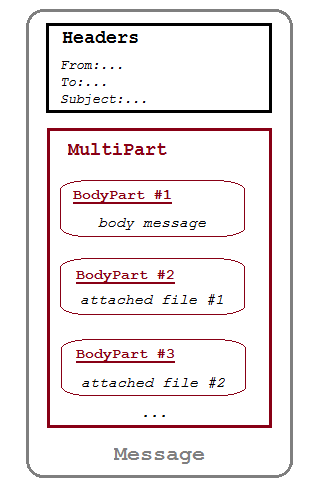 As we can see, a message comprises of a header and a body. The body must be of type Multipartfor containing attachments. The Multipart object holds multiple parts in which each part is represented as a type of BodyPart whose subclass, MimeBodyPart – can take a file as its content.The steps to create a multipart message with multiple parts are as follows:
Message message = new MimeMessage(session); Multipart multipart = new MimeMultipart(); // creates body part for the message MimeBodyPart messageBodyPart = new MimeBodyPart(); messageBodyPart.setContent(message, "text/html"); // creates body part for the attachment MimeBodyPart attachPart = new MimeBodyPart(); // code to add attachment...will be revealed later // adds parts to the multipart multipart.addBodyPart(messageBodyPart); multipart.addBodyPart(attachPart); // sets the multipart as message's content message.setContent(multipart);The MimeBodyPart class provides some convenient methods for attaching a file, but the way is different between JavaMail 1.3 and JavaMail 1.4.With JavaMail 1.3, it requires writing the following code to add an attachment:
// JavaMail 1.3
MimeBodyPart attachPart = new MimeBodyPart();
String attachFile = "D:/Documents/MyFile.mp4";

DataSource source = new FileDataSource(attachFile);
attachPart.setDataHandler(new DataHandler(source));
attachPart.setFileName(new File(attachFile).getName());

multipart.addBodyPart(attachPart);
With JavaMail 1.4, adding an attachment is much simpler with the following new methods introduced in the MimeBodyPart class:
- void attachFile(File file)
- void attachFile(String filePath)
// JavaMail 1.4
MimeBodyPart attachPart = new MimeBodyPart();
String attachFile = "D:/Documents/MyFile.mp4";
attachPart.attachFile(attachFile);
multipart.addBodyPart(attachPart);
The code for JavaMail 1.3 still works in 1.4.Now for a sample program, the following class, EmailAttachmentSender – implements a static method, sendEmailWithAttachments() – which can be used for sending an e-mail message with some attachments. This method requires the following parameters:
- For SMTP server information: host, port number, user name (e-mail address), and password.
- For e-mail message: recipient e-mail address, subject, and message.
- For attached files: an array of String for file paths.
package net.codejava.mail;

import java.io.IOException;
import java.util.Date;
import java.util.Properties;

import javax.mail.Authenticator;
import javax.mail.Message;
import javax.mail.MessagingException;
import javax.mail.Multipart;
import javax.mail.PasswordAuthentication;
import javax.mail.Session;
import javax.mail.Transport;
import javax.mail.internet.AddressException;
import javax.mail.internet.InternetAddress;
import javax.mail.internet.MimeBodyPart;
import javax.mail.internet.MimeMessage;
import javax.mail.internet.MimeMultipart;

public class EmailAttachmentSender {

	public static void sendEmailWithAttachments(String host, String port,
			final String userName, final String password, String toAddress,
			String subject, String message, String[] attachFiles)
			throws AddressException, MessagingException {
		// sets SMTP server properties
		Properties properties = new Properties();
		properties.put("mail.smtp.host", host);
		properties.put("mail.smtp.port", port);
		properties.put("mail.smtp.auth", "true");
		properties.put("mail.smtp.starttls.enable", "true");
		properties.put("mail.user", userName);
		properties.put("mail.password", password);

		// creates a new session with an authenticator
		Authenticator auth = new Authenticator() {
			public PasswordAuthentication getPasswordAuthentication() {
				return new PasswordAuthentication(userName, password);
			}
		};
		Session session = Session.getInstance(properties, auth);

		// creates a new e-mail message
		Message msg = new MimeMessage(session);

		msg.setFrom(new InternetAddress(userName));
		InternetAddress[] toAddresses = { new InternetAddress(toAddress) };
		msg.setRecipients(Message.RecipientType.TO, toAddresses);
		msg.setSubject(subject);
		msg.setSentDate(new Date());

		// creates message part
		MimeBodyPart messageBodyPart = new MimeBodyPart();
		messageBodyPart.setContent(message, "text/html");

		// creates multi-part
		Multipart multipart = new MimeMultipart();
		multipart.addBodyPart(messageBodyPart);

		// adds attachments
		if (attachFiles != null && attachFiles.length > 0) {
			for (String filePath : attachFiles) {
				MimeBodyPart attachPart = new MimeBodyPart();

				try {
					attachPart.attachFile(filePath);
				} catch (IOException ex) {
					ex.printStackTrace();
				}

				multipart.addBodyPart(attachPart);
			}
		}

		// sets the multi-part as e-mail's content
		msg.setContent(multipart);

		// sends the e-mail
		Transport.send(msg);

	}

	/**
	 * Test sending e-mail with attachments
	 */
	public static void main(String[] args) {
		// SMTP info
		String host = "smtp.gmail.com";
		String port = "587";
		String mailFrom = "your-email-address";
		String password = "your-email-password";

		// message info
		String mailTo = "your-friend-email";
		String subject = "New email with attachments";
		String message = "I have some attachments for you.";

		// attachments
		String[] attachFiles = new String[3];
		attachFiles[0] = "e:/Test/Picture.png";
		attachFiles[1] = "e:/Test/Music.mp3";
		attachFiles[2] = "e:/Test/Video.mp4";

		try {
			sendEmailWithAttachments(host, port, mailFrom, password, mailTo,
				subject, message, attachFiles);
			System.out.println("Email sent.");
		} catch (Exception ex) {
			System.out.println("Could not send email.");
			ex.printStackTrace();
		}
	}
}
NOTES:
You need to use JavaMail jar files. If you use Maven, add the following dependency to the pom.xml file:
<dependency>
	<groupId>com.sun.mail</groupId>
	<artifactId>javax.mail</artifactId>
	<version>1.6.2</version>
</dependency>
This will add the javax.mail-VERSION.jar and activation-VERSION.jar to the project's classpath. If you have to add them manually, download from JavaMail Project page.For Swing-based version of the sample program, see this tutorial: Swing application for sending e-mail (with attachments).
Other JavaMail Tutorials:
- How to send plain text email using JavaMail
- How to send email in HTML format using JavaMail
- How to insert images into email for sending with JavaMail
- How to receive emails from server using JavaMail
- How to delete emails programmatically using JavaMail
- How to download attachments in emails using JavaMail
- How to search email messages using JavaMail
About the Author:
 Nam Ha Minh is certified Java programmer (SCJP and SCWCD). He began programming with Java back in the days of Java 1.4 and has been passionate about it ever since. You can connect with him on Facebook and watch his Java videos on YouTube.
 EmailAttachmentSender.java EmailAttachmentSender.java | [Java source code] | 3 kB |
Comments