How to Prettify JSON with curl (Windows and macOS)
- Details
- Written by Nam Ha Minh
- Last Updated on 27 March 2022 | Print Email
{"id":1,"firstName":"Bilbo","lastName":"Baggins","name":"Bilbo Baggins","role":"burglar","_links":{"self":{"href":"http://localhost:8080/employees/1"},"employees":{"href":"http://localhost:8080/employees"}}}Surely you want to have the JSON content formatted nicely like the below, right?{
"id": 1,
"firstName": "Bilbo",
"lastName": "Baggins",
"name": "Bilbo Baggins",
"role": "burglar",
"_links": {
"self": {
"href": "http://localhost:8080/employees/1"
},
"employees": {
"href": "http://localhost:8080/employees"
}
}
}In this quick post, I’m going to share with you how to prettify JSON with curl like that - making API testing using curl more convenient and easier.Basically, to format JSON with curl, you need to use pipe syntax in command line as follows:curl options URI | <another_tool>
Here, | is the pipe character, followed by another tool that processes the output given from curl.1. How to prettify JSON with curl on Windows
On Windows, you can use jq or NodeJS’s json tool as JSON beautifier for curl.Using jq:jq is a lightweight and flexible command-line JSON processor. Visit this page to download its executable EXE file. You will have jq-win64.exe file. Copy it to C:\Windows\System32 and change the name to just jq.exe.curl localhost:8080/employees/1 | jq
The output will look like this: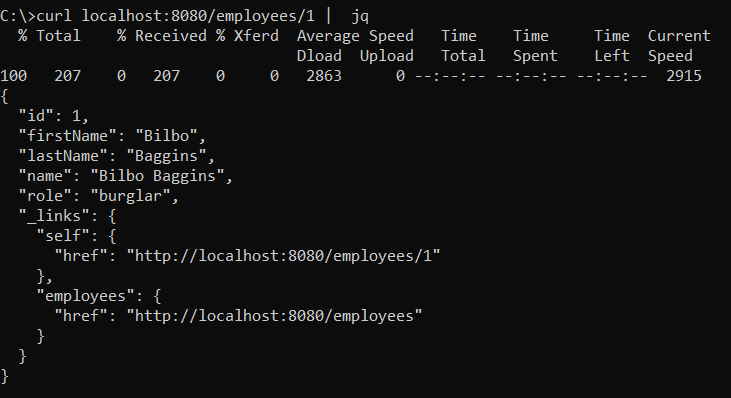 Using NodeJS:Download and install NodeJS from its official homepage. Then open a new command prompt, type the following:
npm install -g jsontool
This command will install JSON tool. Then you can pretty print JSON output from curl using the follow command:curl localhost:8080/employees/1 | json
2. How to prettify JSON with curl on macOS
On macOS, you don’t have to install extra software as macOS comes with pre-installed tools that can format JSON, such as Python and json_pp. So in the terminal you just type:curl localhost:8080/employees/1 | json_pp
or:curl localhost:8080/employees/1 | python -m json.tool
That’s few tips you can use to prettify JSON output when testing REST APIs using curl. I hope you found this post helpful. Thanks for reading.Other Java Coding Tutorials:
- Java code example to import data from Excel to database
- How to display images from database in JSP page with Java Servlet
- How to implement remember password (remember me) for Java web application
- How to code login and logout with Java Servlet, JSP and MySQL
- How to Code Hit Counter for Java web application
- 10 Common Mistakes Every Beginner Java Programmer Makes
- 10 Java Core Best Practices Every Java Programmer Should Know
- How to become a good programmer? 13 tasks you should practice now
- How to calculate MD5 and SHA hash values in Java
- Java File Encryption and Decryption Example
About the Author:
 Nam Ha Minh is certified Java programmer (SCJP and SCWCD). He began programming with Java back in the days of Java 1.4 and has been passionate about it ever since. You can connect with him on Facebook and watch his Java videos on YouTube.