Spring and Struts Integration Tutorial Part 2: Java-Based and Annotations
- Details
- Written by Nam Ha Minh
- Last Updated on 21 June 2019 | Print Email
1. Adding Maven Dependencies
All the required dependencies are almost as same as the part 1. The only new dependency is the Struts2 Convention Plug-in which enables annotation-based configuration for mapping actions and results in Struts. So add the following dependency into your pom.xml file:<dependency> <groupId>org.apache.struts</groupId> <artifactId>struts2-convention-plugin</artifactId> <version>2.3.20</version> </dependency>You can see that the latest version of Struts 2 framework is used, 2.3.20. To understand more about Struts 2 annotations, refer to Struts2 Beginner Tutorial with Annotations.
2. Coding Model Class
The model class (User.java) is pretty simple. Here’s the code:/**
* Copyright (C) CodeJava.net from 2012 To Present
* All rights reserved.
*/
package net.codejava.struts;
public class User {
private String username;
private String email;
private String password;
public String getUsername() {
return username;
}
public void setUsername(String username) {
this.username = username;
}
public String getEmail() {
return email;
}
public void setEmail(String email) {
this.email = email;
}
public String getPassword() {
return password;
}
public void setPassword(String password) {
this.password = password;
}
}3. Coding Login Form
Create a directory called views under WEB-INF directory which is under WebContent (or web-app). Then create a file named LoginForm.jsp with the following code:<%@ page language="java" contentType="text/html; charset=UTF-8"
pageEncoding="UTF-8"%>
<%@ taglib prefix="s" uri="/struts-tags" %>
<!DOCTYPE html PUBLIC "-//W3C//DTD HTML 4.01 Transitional//EN"
"http://www.w3.org/TR/html4/loose.dtd">
<html>
<head>
<meta http-equiv="Content-Type" content="text/html; charset=UTF-8">
<title>Spring and Struts Integration Demo</title>
</head>
<body>
<div align="center">
<h1>Spring and Struts Integration Demo</h1>
<h2>Users Login</h2>
<s:form action="doLogin" method="post">
<s:textfield label="Username" name="user.username" />
<s:password label="Password" name="user.password" />
<s:submit value="Login" />
</s:form>
</div>
</body>
</html>Note that the URL in the form’s action attribute is: /doLogin. We’ll configure an appropriate action class to handle this URL later. 4. Coding Success and Error Pages
The LoginSuccess.jsp and LoginError.jsp pages are as same as in the part 1. We list the code here for your convenience.Code of the Success page:<%@ page language="java" contentType="text/html; charset=UTF-8"
pageEncoding="UTF-8"%>
<!DOCTYPE html PUBLIC "-//W3C//DTD HTML 4.01 Transitional//EN"
"http://www.w3.org/TR/html4/loose.dtd">
<html>
<head>
<meta http-equiv="Content-Type" content="text/html; charset=UTF-8">
<title>Login Success</title>
</head>
<body>
<div align="center">
<h1>Welcome to CodeJava.net</h1>
</div>
</body>
</html>Code of the Error page:<%@ page language="java" contentType="text/html; charset=UTF-8"
pageEncoding="UTF-8"%>
<!DOCTYPE html PUBLIC "-//W3C//DTD HTML 4.01 Transitional//EN"
"http://www.w3.org/TR/html4/loose.dtd">
<html>
<head>
<meta http-equiv="Content-Type" content="text/html; charset=UTF-8">
<title>Login Error</title>
</head>
<body>
<div align="center">
<h1>Error login. Wrong username/password</h1>
</div>
</body>
</html>You will see how to configure redirection to these pages in the next section about Struts action classes. 5. Coding Business Class
The business class (UserDAO.java) is quite simple. It has only one method: checkLogin(). Here’s the code:/**
* Copyright (C) CodeJava.net from 2012 To Present
* All rights reserved.
*/
package net.codejava.struts;
public class UserDAO {
public boolean checkLogin(User user) {
return user.getUsername().equals("admin")
&& user.getPassword().equals("nimda");
}
}You will see how to auto-wire this business class into a Struts action class in the next section. 6. Coding Struts Action Classes
There are two action classes we need to create in this application. The first one is used to handle the URL /login by redirecting to the Login form.Code of the ViewLoginAction class:/**
* Copyright (C) CodeJava.net from 2012 To Present
* All rights reserved.
*/
package net.codejava.struts;
import org.apache.struts2.convention.annotation.Action;
import org.apache.struts2.convention.annotation.Result;
import org.apache.struts2.convention.annotation.ResultPath;
import com.opensymphony.xwork2.ActionSupport;
@Action("login")
@ResultPath("/WEB-INF/views")
@Result(name = "success", location = "LoginForm.jsp")
public class ViewLoginAction extends ActionSupport {
// this is intentionally empty
}And the second action class (DoLoginAction.java) is for handling submission from the login form (URL /doLogin). Here’s its code:/**
* Copyright (C) CodeJava.net from 2012 To Present
* All rights reserved.
*/
package net.codejava.struts;
import org.apache.struts2.convention.annotation.Action;
import org.apache.struts2.convention.annotation.Result;
import org.apache.struts2.convention.annotation.ResultPath;
import org.apache.struts2.convention.annotation.Results;
import org.springframework.beans.factory.annotation.Autowired;
import com.opensymphony.xwork2.ActionSupport;
@Action("/doLogin")
@ResultPath("/WEB-INF/views")
@Results({
@Result(name = "success", location = "LoginSuccess.jsp"),
@Result(name = "error", location = "LoginError.jsp")
})
public class DoLoginAction extends ActionSupport {
@Autowired
private UserDAO userDAO;
private User user;
public void setUser(User user) {
this.user = user;
}
public User getUser() {
return user;
}
public String execute() {
if (userDAO.checkLogin(user)) {
return SUCCESS;
}
return ERROR;
}
}Note that the @Autowired annotation (from Spring) is used to let Spring automatically inject an instance of the UserDAO class into the instance of this action class:@Autowired private UserDAO userDAO;You’ll see how to let Spring manage an instance of the UserDAO class in the next section.
7. Bootstrapping Struts and Spring Programmatically
This is the most important part of the application because it enables the integration between Struts and Spring in a single web application, using 100% Java code and no XML at all.First, create the WebAppInitializer class with the following code:/**
* Copyright (C) CodeJava.net from 2012 To Present
* All rights reserved.
*/
package net.codejava.struts.config;
import java.util.EnumSet;
import javax.servlet.DispatcherType;
import javax.servlet.FilterRegistration;
import javax.servlet.ServletContext;
import javax.servlet.ServletException;
import org.apache.struts2.dispatcher.ng.filter.StrutsPrepareAndExecuteFilter;
import org.springframework.web.WebApplicationInitializer;
import org.springframework.web.context.ContextLoaderListener;
import org.springframework.web.context.support.AnnotationConfigWebApplicationContext;
public class WebAppInitializer implements WebApplicationInitializer {
@Override
public void onStartup(ServletContext servletContext) throws ServletException {
AnnotationConfigWebApplicationContext appContext
	= new AnnotationConfigWebApplicationContext();
appContext.register(ApplicationContextConfig.class);

ContextLoaderListener contextLoaderListener = new ContextLoaderListener(appContext);
servletContext.addListener(contextLoaderListener);
FilterRegistration.Dynamic filter = servletContext.addFilter(
		"StrutsDispatcher", new StrutsPrepareAndExecuteFilter());
filter.addMappingForUrlPatterns(EnumSet.of(DispatcherType.REQUEST), true, "/*");
}
}You can see that the Spring framework is configured as a context listener:AnnotationConfigWebApplicationContext appContext = new AnnotationConfigWebApplicationContext(); appContext.register(ApplicationContextConfig.class); ContextLoaderListener contextLoaderListener = new ContextLoaderListener(appContext); servletContext.addListener(contextLoaderListener);On start-up, Spring looks for configuration in the ApplicationContextConfig class which is described in the next section.And the Struts framework is configured as the primary dispatcher filter:
FilterRegistration.Dynamic filter = servletContext.addFilter( "StrutsDispatcher", new StrutsPrepareAndExecuteFilter()); filter.addMappingForUrlPatterns(EnumSet.of(DispatcherType.REQUEST), true, "/*");This configuration allows Struts framework intercepts all requests coming through the application.For more information regarding how to bootstrap a framework programmatically in Java EE, see the tutorial: Bootstrapping a Spring Web MVC application programmatically.
8. Configuring Spring Application Context
In this integration, Spring acts as a dependency injection container so it is used to manage beans and inject dependencies if any. Create the ApplicationContextConfig class with the following code:/**
* Copyright (C) CodeJava.net from 2012 To Present
* All rights reserved.
*/
package net.codejava.struts.config;
import net.codejava.struts.UserDAO;
import org.springframework.context.annotation.Bean;
import org.springframework.context.annotation.ComponentScan;
import org.springframework.context.annotation.Configuration;
@Configuration
@ComponentScan("net.codejava.struts")
public class ApplicationContextConfig {
@Bean(name = "userDAO")
public UserDAO getUserDAO() {
return new UserDAO();
}
}Here, we declare only one bean instance for the UserDAO class, which is then injected into the Struts action class. That’s all for the code stuffs. 9. Reviewing Final Project Structure
Finally we have the project looks like as the following screenshot: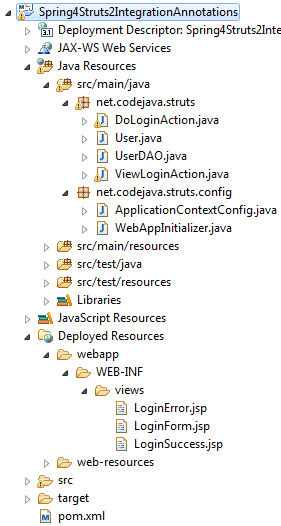 Refer to this structure in case you did something wrong.
 10. Testing the Application
Testing is the same as the part 1. The only difference is the URL of the login form. Type the following URL:http://localhost:8080/Spring4Struts2IntegrationAnnotations/login
Then the login form appears. Enter username as ‘admin’ and password as ‘nimda’, and then hit Enter. You will see the success page; otherwise the error page gets displayed.Congratulations! You have done the second part of Spring and Struts integration series. You can now master the key concepts and techniques in implementing a Spring-Struts application.References:
Related Spring-Struts Integration Tutorials:
- Spring and Struts Integration Tutorial Part 1: XML Configuration
- Struts - Spring - Hibernate Integration Tutorial Part 1 - XML Configuration
- Struts - Spring - Hibernate Integration Tutorial Part 2 - Java-Based and Annotations
Other Spring Tutorials:
- Understand the core of Spring framework
- Understand Spring MVC
- Understand Spring AOP
- Spring MVC beginner tutorial with Spring Tool Suite IDE
- Spring MVC Form Handling Tutorial
- Spring MVC Form Validation Tutorial
- Spring MVC with JdbcTemplate Example
- Spring MVC + Spring Data JPA + Hibernate - CRUD Example
- 14 Tips for Writing Spring MVC Controller
About the Author:
 Nam Ha Minh is certified Java programmer (SCJP and SCWCD). He began programming with Java back in the days of Java 1.4 and has been passionate about it ever since. You can connect with him on Facebook and watch his Java videos on YouTube.
 Spring4Struts2IntegrationAnnotations.zip Spring4Struts2IntegrationAnnotations.zip | [Sample Spring-Struts Eclipse Project] | 23 kB |