Show save file dialog using JFileChooser
- Details
- Written by Nam Ha Minh
- Last Updated on 06 July 2019 | Print Email
Swing provides class javax.swing.JFileChooser that can be used to present a dialog for user to choose a location and type a file name to be saved, using showSaveDialog() method. Syntax of this method is as follows:
public int showSaveDialog(Component parent)
where parentis the parent component of the dialog, such as a JFrame. Once the user typed a file name and select OK or Cancel, the method returns one of the following value:
- JFileChooser.CANCEL_OPTION : the user cancels file selection.
- JFileChooser.APPROVE_OPTION: the user accepts file selection.
- JFileChooser.ERROR_OPTION: if there’s an error or the user closes the dialog by clicking on X button.
After the dialog is dismissed and the user approved a selection, use the following methods to get the selected file:
FilegetSelectedFile()
Before calling showSaveDialog() method, you may want to set some options for the dialog:
setDialogTitle(String)sets a custom title text for the dialog.setCurrentDirectory(File)sets the directory where will be saved.
Following is an example code:
// parent component of the dialog
JFrame parentFrame = new JFrame();

JFileChooser fileChooser = new JFileChooser();
fileChooser.setDialogTitle("Specify a file to save");

int userSelection = fileChooser.showSaveDialog(parentFrame);

if (userSelection == JFileChooser.APPROVE_OPTION) {
    File fileToSave = fileChooser.getSelectedFile();
    System.out.println("Save as file: " + fileToSave.getAbsolutePath());
}
And following is a screenshot of the dialog:
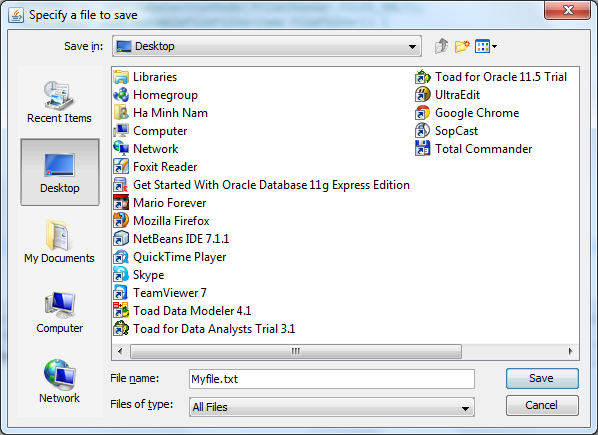
You can download a fully working example code in the attachment section.
Related Swing File Chooser Tutorials:
- File picker component in Swing
- Add file filter for JFileChooser dialog
- Show simple open file dialog using JFileChooser
Other Java Swing Tutorials:
- Java Swing Hello World Tutorial for Beginners Using Text Editor
- JFrame basic tutorial and examples
- JPanel basic tutorial and examples
- JLabel basic tutorial and examples
- JTextField basic tutorial and examples
- JButton basic tutorial and examples
About the Author:
 Nam Ha Minh is certified Java programmer (SCJP and SCWCD). He began programming with Java back in the days of Java 1.4 and has been passionate about it ever since. You can connect with him on Facebook and watch his Java videos on YouTube.
 SaveFileDialogExample.java SaveFileDialogExample.java | [source code] | 1 kB |
Comments
I want to save my file. For example ;
///////////////////////////////////////////////////////////////////////////////
File delFile4= new File("C:\\Users\\Batuhan\\Desktop\\BiletArsivi.zip");
////////////////////////////////////////////////////////////////////////////////
this is my file and ı want to save , user want to where select pathadress.
sorry my englısh but you can help me
how can it be error when awt components can work in swing ??